Obfuscation & Deobfuscation
Overview
Room URL: https://tryhackme.com/room/obfuscation-aoc2025-e5r8t2y6u9
Difficulty: Medium
Category: Obfuscation
Date Completed: 12/18/2025
Objectives
- Learn about obfuscation, why and where it is used.
- Learn the difference between encoding, encryption, and obfuscation.
- Learn about obfuscation and the common techniques.
- Use CyberChef to recover plaintext safely.
Table of Contents
Introduction
Walk Through
Lessons Learned
Resources
Introduction
This challenge puts defenders in the shoes of McSkidy, a security analyst investigating a suspicious phishing email. The narrative centers around a malicious PowerShell script (SantaStealer.ps1) extracted from a PDF attachment. The objective is twofold: first, deobfuscate hidden content within the script to understand its malicious intent, and second, demonstrate offensive obfuscation techniques by encoding sensitive data (an API key) to evade detection. This two-part challenge serves as an excellent introduction to common obfuscation methods used by threat actors, including Base64 encoding and XOR encryption, while emphasizing the importance of CyberChef as a Swiss Army knife for cryptographic operations.
Tools & Techniques
- CyberChef: The primary tool for both deobfuscation (Part 1) and obfuscation (Part 2). Its intuitive drag-and-drop interface and real-time output made it ideal for rapid experimentation.
- Visual Studio Code (VS Code): Used as the execution environment for the PowerShell script. A critical step was trusting the workspace in VS Code to allow script execution without security warnings.
- PowerShell Terminal: Executed the modified script to retrieve flags after completing each obfuscation/deobfuscation task.
Walk Through
Part 1: Deobfuscation (Obtaining Flag 1)
-
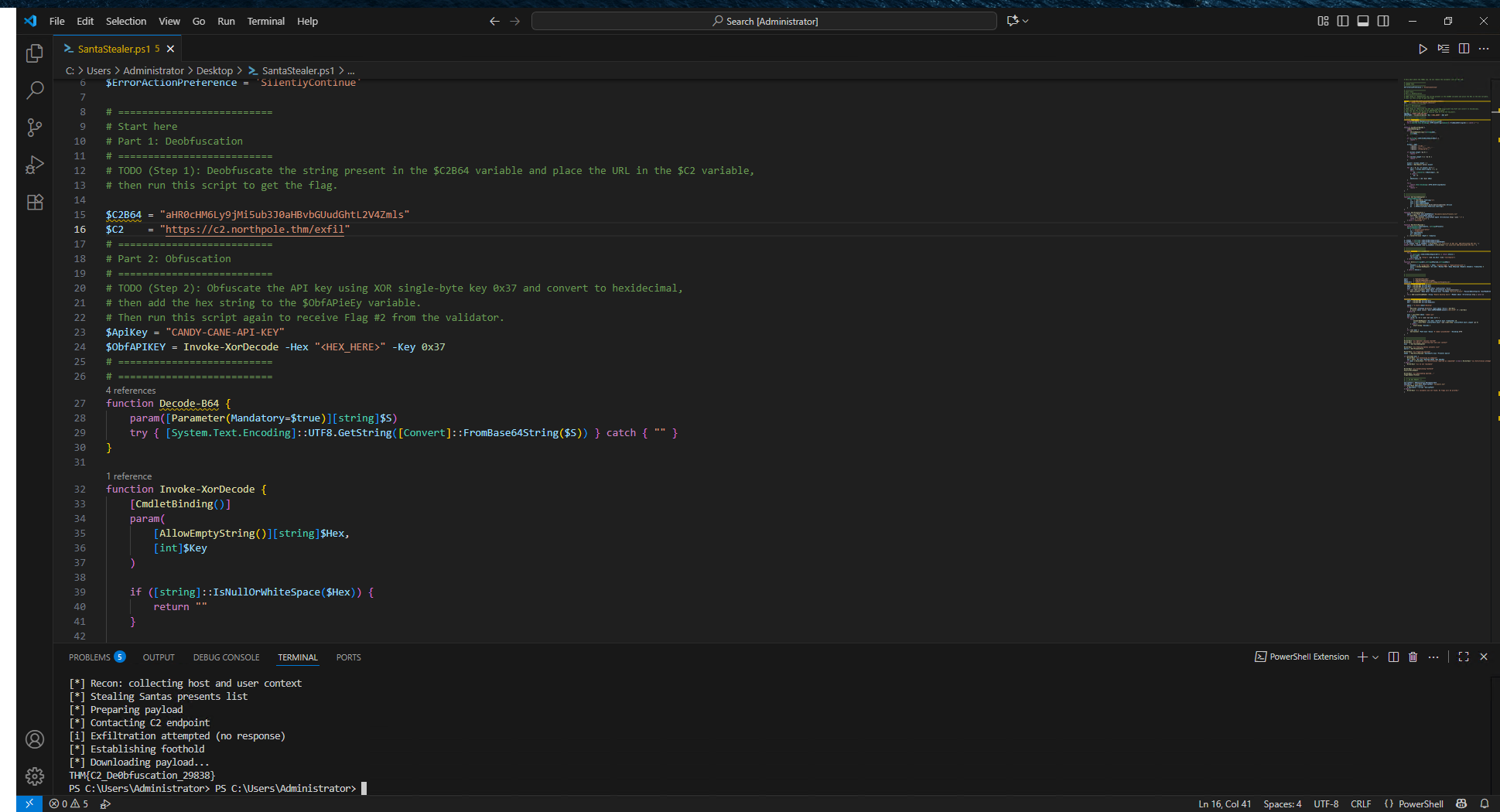
Script Analysis: Opened
SantaStealer.ps1in Visual Studio Code and navigated to the "Start here" section as instructed by the in-code comments. -
Pattern Recognition: Identified a Base64-encoded string within the script—characterized by a long sequence of alphanumeric characters with
=padding. -
Deobfuscation with CyberChef:
- Opened CyberChef
- Pasted the Base64 string into the Input pane
- Dragged the From Base64 operation into the Recipe section
- Clicked BAKE! to decode the string into plaintext
-
Script Modification: Replaced the obfuscated string in the PowerShell script with the decoded plaintext as per the challenge instructions.
-
Execution: Saved the modified script, opened PowerShell, navigated to the Desktop directory (
cd .\Desktop\), and executed the script (.\SantaStealer.ps1) without debugging. Flag 1 retrieved successfully. -
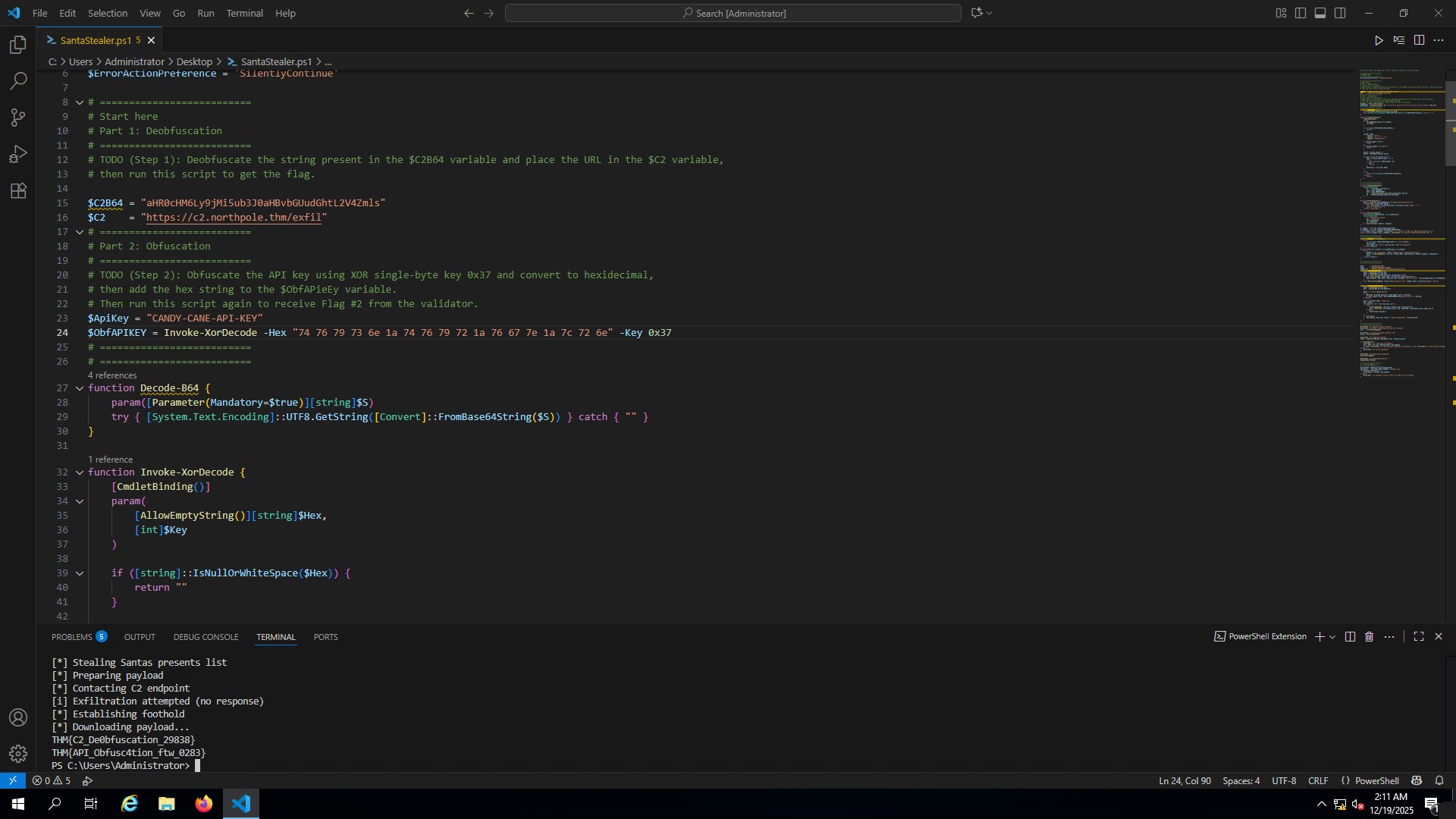
Objective Understanding: The second challenge required encoding the malicious actor's API key using XOR encryption with a specific key (
0x37in hexadecimal) to simulate how attackers hide sensitive credentials. -
Obfuscation with CyberChef:
- Entered the plaintext API key (found in the script) into CyberChef's Input pane
- Dragged the XOR operation into the Recipe section
- Configured the XOR key as
37and set the dropdown to Hex (ensuring the key was interpreted as hexadecimal0x37, not ASCII) - The Output pane displayed the XOR-encrypted result in hexadecimal format
-
Script Update: Replaced the plaintext API key in the PowerShell script with the newly obfuscated hexadecimal string as instructed by the "Part 2" comments.
-
Final Execution: Saved and re-ran the script in PowerShell. Flag 2 retrieved successfully.
Lessons Learned
- Security Through Obscurity Fails: This challenge demonstrates that obfuscation (Base64, XOR) merely delays investigation rather than prevents it. Freely available tools like CyberChef make these techniques trivially reversible.
- Implement Behavioral Analysis: Deploy EDR solutions that monitor script execution behavior rather than relying on static signatures. PowerShell scripts executing suspicious commands should trigger alerts regardless of obfuscation.
- Enable PowerShell Logging: Activate PowerShell Script Block Logging and Transcription to capture deobfuscated command execution in real-time, making forensics significantly easier.
- Use Application Whitelisting: Implement AppLocker or WDAC to restrict PowerShell execution to trusted, digitally-signed scripts only.
- Deploy Advanced Email Security: Use sandboxing solutions that detonate PDF attachments in isolated environments to expose embedded scripts before reaching end users.